What’s The Best Time to Post on Social Media For Clients?
- •
- 7 min read

ChatGPT searches Google Shopping to find products to recommend. When you optimize WooCommerce feeds for Google Shopping, you also optimize for ChatGPT and other AI assistants. Focus on GTINs, clear titles, variation images, and supplemental feeds. This is the fastest way to boost client sales in shopping ads and AI recommendations.
And, if you manage WooCommerce shops for clients, that’s an out of the box feature you can use as a selling point.
ChatGPT doesn’t have its own product database. Yet. When someone asks, “what’s the best wireless keyboard under $50?” ChatGPT searches Google Shopping. It recommends what it finds there. Claude, Perplexity, and other AI assistants work the same way.
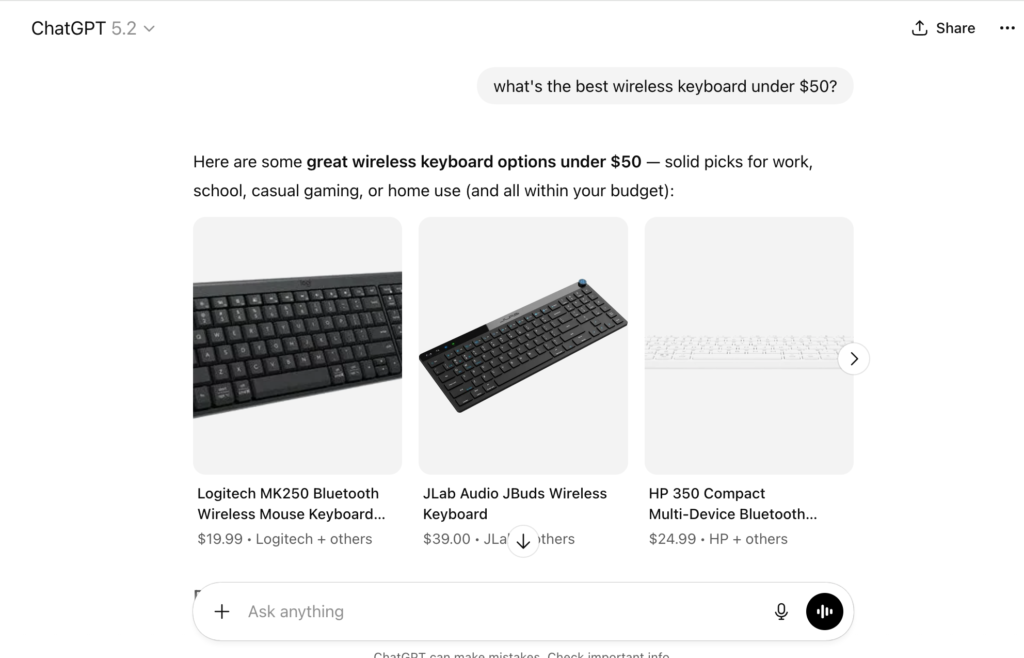
Most Google Merchant Center problems come from bad feeds, not shopping ad bidding. Missing GTINs, unclear titles, or wrong variation images hurt your rankings. This affects both shopping results and AI recommendations.
A simple feed audit can fix these problems, improve click-through rates, and create extra revenue for your agency.
“(Even with AI) … personalization is crucial. Shoppers have too many choices. If you can excel at personalization, you’ll differentiate yourself.”
Rocket.net – Why WooCommerce is Still Better Than Shopify
Here’s what changed in 2024: ChatGPT started searching Google Shopping to find products to recommend. According to Semrush, brands should focus on optimizing Google Shopping first. Products that rank highly there will likely show up in ChatGPT shopping recommendations.
This means your client’s WooCommerce feed optimization now works in two places:
You decide if you charge extra or if it’s part of your amazing service.
Optimizing feeds means:
A feed audit can cost $500–1,000. Clients often pay $100/month for ongoing feed checks and updates. That’s recurring revenue for work most agencies skip.
“ChatGPT shopping is a new channel, not just a new feature. One where conversation replaces search bars and product discovery happens through real-time, AI-driven recommendations.”
Neilpatel.com
Feed optimization isn’t complicated. It just needs to be done right. These five steps cover everything from titles to images to AI compatibility. Follow them in order, and your client’s products will rank higher in both Google Shopping and ChatGPT recommendations.
Mobile users only see the first 70 characters in Google Shopping. Make them count.
Format: Brand + Main Feature + Size/Color
Example: Nike Air Max 90 Black/Red Men’s 10
| Industry | Title Formula | WordPress Tip |
| Apparel | Brand + Style + Color/Size | Conditional rules via WPML |
| Tech | Brand + Model + RAM/Storage | Use ACF custom fields for GTIN |
| Auto | Brand + Part + Year/Make | Functions.php export hooks |
eCommerce Tip: Test titles in Google Sheets supplemental feeds. This lets you improve CTR without changing site SEO. Industry reports show 20–30% CTR gains using this method.
A supplemental feed is a Google Sheet that changes product data just for Google Shopping. Your website keeps its SEO-optimized titles. Your ads use conversion-focused ones. Set it up once, then test variations without touching WordPress.
Missing GTINs cause most feed rejections. GTINs are unique product codes. They help shoppers get exactly what they ordered. According to GS1, GTINs make sure customers receive the correct item every time.
Here’s how to fix this:
Agency Pitch:“We’ll optimize your product feeds so you rank higher in Google Shopping AND get recommended by ChatGPT when shoppers ask for product suggestions. It’s one optimization that works in two places.”
Each product variation should have its own feed row with item_group_id, variation-specific price, stock, and images.
Show your products in real settings. A running shoe on a trail performs better than one on a white background. Shoppers want to visualize ownership. Even products need a hero shot.
There are many AI photo tools that can take your basic photo and put it into a lifestyle shot.
Bonus: “I Tested 20+ AI Tools for Product Photography. Here Are the Top 8 for 2025” by Anangsha Alammyan
Link related variations together with item_group_id so shoppers can easily compare options
When ChatGPT added shopping features, it didn’t build a product database. It searches Google Shopping. It recommends what ranks highest there.
If you are in eCommerce, you should focus on optimizing for Google Shopping first and foremost. Products ranking highly there are very likely to be included in any ChatGPT Shopping recommendations.
So: optimize once for Google Shopping, appear everywhere AI assistants recommend products.
The pattern is clear: all AI tools rely on Google Shopping data. Win there, and you win everywhere AI makes recommendations.
“ChatGPT doesn’t just show results; it provides a curated, personalized buyer’s guide that simplifies the traditionally time-consuming product research process.”
WebFX
Hosting advantage: Fast hosting means faster feed syncs. When your server responds quickly, Google processes feed updates faster. It approves products sooner. Clients see 2x faster approvals on premium managed WordPress hosting compared to shared hosting.
| Service | Price | Why Clients Pay |
| Feed Audit | $750 | Fixes 90% of disapprovals |
| Title A/B Setup | $400 | Boosts CTR 25% |
| Monthly Feed Sync | $100/mo | Passive revenue |
These prices reflect the value you deliver. A feed audit that prevents $2,000 in wasted ad spend is worth $750 to your client.
“In order for products to show up on ChatGPT, your SEO game needs to be on point. WordPress has the SEO infrastructure to beat Shopify any day of the week… Oh and by the way, this little search tool called Google also has AI mode. ChatGPT is just trending; not dominating.”
Rocket.net – Is ChatGPT’s Buy It With Shopify a Threat to WooCommerce?
ChatGPT Shopping Research (Official OpenAI)
Shopping with ChatGPT Search (Help Center)
Instant Checkout for Merchants
Start with GTINs. They cause most rejections. Add proper GS1 product identifiers to all items. Then optimize titles to 70 characters. Verify each variation has the correct image. Most of the time you can fix 90% of errors in one audit.
Both, but separately. Use supplemental feeds to create Google Shopping-specific titles. Don’t change your website. Your site keeps SEO-optimized titles. Your ads use conversion-focused ones.
Industry standard is $500–1,000 for initial audits. Charge $100/month for ongoing management. Price based on value delivered. This means preventing wasted ad spend and increasing sales. Don’t price based on time spent.
Yes. Fast hosting means Google can crawl and process feed updates efficiently. Premium managed WordPress hosting delivers 2x faster approval times. This happens because feed syncs complete without timeouts or errors.
ChatGPT and other AI tools don’t have their own product databases. When users ask for product recommendations, these assistants search Google Shopping in real-time. They recommend top-ranking products. This means optimizing for Google Shopping also optimizes for AI recommendations.
“ChatGPT does create additional shopping queries that it sends to Google Shopping. Most of the time, the Google Shopping results will then shape the final products that are included in ChatGPT’s response.”
Semrush
To get better results for your clients:
Result: Higher CTR, fewer disapprovals, faster campaigns, and happier clients. Agencies that do this consistently outperform competitors.
The beauty of feed optimization is that it compounds. Better feeds lead to higher rankings. Higher rankings lead to more clicks. More clicks lead to more data. More data helps you optimize further.
Google Listings & Ads Plugin (Free, official)
Google Product Feed Extension (Premium, official)
Google Shopping Integration Documentation
Grow your web agency with lightning-fast, secure, and optimized websites that are easy to set up and manage. Top-tier agencies and online businesses choose Rocket.net as their trusted managed WordPress hosting provider — you should, too.